 B
BThis year I participated in js13kGames for the first time, making a little 3D platformer called Unifrost. I think the game turned out great! Working under interesting constraints and with a deadline usually works great to motivate me to make – and finish! – cool stuff.
In Unifrost, you gallop and jump your way around a large map collecting the seven lost shards of the Bifrost. You can create rainbows in the air, one for each shard collected, and ride them for a short distance. As a unicorn, you can, of course, also leap horn-first into a wall and fling yourself upwards.
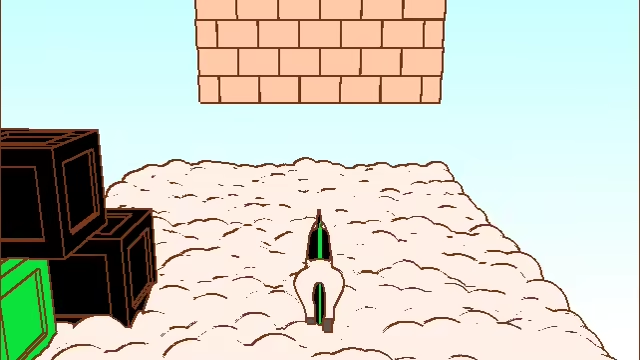
Surprisingly, I never ended up hitting the 13K limit (if anything, it’s time I ran out of). Once I finished the map on the last evening, I still had around 4KB left. After throwing in the ZzFX sound engine, some sound effects, and a really unoptimized SVG logo (~1.5K compressed), my final submission zip ended up at 12.17KB.
A lot of people have expressed an interest in how I did the 3D rendering and fit it all in just 13KB, so I’ll try to go through that, alongside some other thoughts on making the game! You can also check out the source code on GitHub – it’s MIT-licensed, so the code is even free to re-use for anyone who wants to build something upon it.
This write-up ended up a little on the longer end, but feel free of course to just skim through the headings and read whichever sections most peak your interest!
Build system and workflow #
My build setup looks as follow, I don’t think there’s anything particularly unexpected here:
- TypeScript
- Vite as development server and bundler/build tool.
- Terser for minification, with maxed-out-settings (property mangling and
passes: 3in particular made a big difference). - Script bundle inlined into index.html.
- A GLSL minifier. It pretty much just strips whitespace and comments so shaders still benefit from heavy manual golfing (all my uniforms and variables have single character names, for example).
- HTML minified by a tiny custom plugin that just strips whitespace and some junk that Vite adds (the pre-made HTML minifier I tried didn’t work with vite-plugin-singlefile).
- Another custom Vite plugin packs everything with advzip, and prints out how many bytes I’ve used and how much remains. This way, running
vite buildin watch mode gives me instant feedback on the impact of every addition or optimization attempt. - A separate watch-mode script generates my binary data file and writes it to the
publicdirectory that Vite copies to the output
Vite supports hooking into its hot-reload signals to do surgical replacement, but I just have it do a full page reload on every change. I put in a super-simple debug-only save system that restores the player position and camera angles on reload to make it less destructive, along with some cheat-keys (to unlock shards and restart, for example).
There’s not a lot of crazy code golfing in the TypeScript source, because Terser does so many clever transformations already. I stuck to a very procedural coding style; there are no classes and not even many objects. A lot of state is kept in top-level module scope variables and I mostly use free functions. I saved some extra space by using a file with numeric GL constants instead of the unmangleable built-in properties on the WebGL2RenderingContext object.
I never use AI coding agents for personal projects – paying to avoid coding kinda defeats the point of recreational programming challenges – but I can’t claim the game’s code is 100% organic either: I use LLM chatbots (currently a free ChatGPT account) in much the same way I use search engines and StackOverflow answers, with the alluring added convenience of being able to ask precise questions in natural language and with my exact code for context.
Rendering #
Even before the competition begun, I already knew I wanted to make a 3D game, probably a platformer or adventure game of some sort, and I had some ideas on how it could maybe be done. Unifrost uses a WebGL2 renderer written from scratch (plus some HTML elements for the UI).
Primitives #
Everything in the game is made up of one of three procedurally generated primitives: pills, boxes, and ribbons.
Pills are tapered capsules, in the sense that each end can have a different radius (another participant, Chris Subagio, independently used a similar primitive and called it a “capsulite”, which is a much cooler name!).
Likewise, boxes can have different sizes at the bottom and top (I think this technically makes them square frustums).
The ribbon is just a plane subdivided along one axis. It’s used for the rainbows, which are scaled and bent by the vertex shader.
Colors #
The game has no lighting, and no textures. Every primitive is either rainbow-striped or a single color. Outlines are screen-space. This art style is something I’ve experimented with a lot in the past. I’m fond of how it looks, but it’s also a fantastic fit for making super-simple 3D models. Totally flat colors are great when everything is made up of disjoined primitives, because it hides all the seams – you don’t need to worry about normal or UV discontinuities when there are no normals or UVs! The outlines tie it all together, making sure 3D shapes are readable despite the lack of lighting, and separating objects of the same color.
Colors are palette-based; the object shader receives a per-object color index along with the palette as an array of colors. In addition to being good for size, this made it easy to add and remove colors dynamically. The seven colors of the rainbow actually occur thrice in the palette: One fixed set for the collectible shards, one set for the level objects that begin black and are restored to color as you collect shards, and one set for the player that reflects your remaining rainbow-riding uses. I based the color palette on the PICO-8 palette.
Frametime optimizations #
At first, each occurrence of a primitive was a separate draw call. Then I added the clouds, which are just a whole lot of spheres, and they tanked performance much more severely than I’d expected.
My first optimization was switching to instanced rendering. Instead of immediately dispatching a WebGL2 draw call, my draw function now just pushes per-instance data (transformation matrix, color, and some other parameters) into an array keyed by the mesh. Then I do a single drawArraysInstanced call per mesh, which means all clouds in the level are drawn by a single draw call (draw calls could be reduced even further if I actually deduplicated identical meshes, but it wasn’t really needed).
This helped, but drawing was still quite slow. The GL calls weren’t the issue any more, rather it was my drawing function. As is easy to do in JavaScript, there are a lot more per-frame memory allocations than you’d ideally want in a hot path (i.e. none), and the multiple DOMMatrix multiplications for the transform hierarchies seemed to be quite heavy. I started looking at ways to optimize this, but I soon realized that the biggest win was to simply not draw most objects every frame! The bulk of the objects consists of level geometry (clouds, pillars, walls, etc.), which is all static, so I can just fill a buffer with static instance data once and reuse it. The camera matrix is a global uniform, not per-object, so camera movement doesn’t require updating the instance data.
The drawing of dynamic objects (the player, NPCs, balloons) can still get a bit slow (but it works on my machine :) ), so there’s definitely a lot of room left for optimization here.
Post-processing #
There are only two shader programs in Unifrost. One object shader, and one post-processing shader. The post-processing shader does edge detection by depth and by surface + object index. It also draws the sky gradient that makes up the background, and the colored screen wipes when you respawn or collect a shard. The postprocessing vertex shader creates a fullscreen triangle procedurally:
#version 300 es

out vec2 v; // clip-space position (0..1)

void main() {
	gl_Position = vec4(v = vec2(gl_VertexID*4 & 4, gl_VertexID*4 & 8) - 1., 0, 1);
}
The fragment shader is where the interesting stuff happens, but it’s not exactly easy to read:
#version 300 es
precision highp float;

in vec2 v; // clip-space position position

uniform vec4 p[21]; // palette
// c = color texture, s = surface index texture, d = depth texture
uniform sampler2D c, d;
uniform highp usampler2D s;
uniform vec2 t; // .x = transition progress, .y = transition color

layout(location=0) out vec4 o; // output color

float D(vec2 u) {
	return texture(d, v*.5+.5 + u).r;
}

void main() {
	o = mix(
		p[int(t.y)], // screen wipe color
		vec4(
			// surface index outlines
			any(notEqual(texture(s, v*.5+.5 + vec2(2./640., 0)), texture(s, v*.5+.5)))
			|| any(notEqual(texture(s, v*.5+.5 + vec2(0, 2./480.)), texture(s, v*.5+.5)))
			||
			// depth outlines
			max(
				abs(D(vec2(2./640., 0)) - D(vec2(0, 0))),
				abs(D(vec2(0, 2./480.)) - D(vec2(0, 0)))
			) > .0005
			// outline color (this could actually be p[13] I realize writing this)
			?vec3(.467, .2, .067)
			:mix(
				// sky gradient
				mix(vec3(1), vec3(.698, 1, 1), v.y*0.5+0.3),
				texture(c, v*.5+.5).rgb,
				texture(c, v*.5+.5).a
			),
			1.
		),
		// screen transition blend
		step(t.x*2. + sin((-v.x+v.y)*22.)*.01, (-v.x*.5+.5 - v.y*.5+.5)*.5)
		+ 1. - step(t.x*2. - 1. + sin((v.x+v.y)*22.)*.01, (-v.x*.5+.5 + v.y*.5+.5)*.5)
	);
}
Depth outlines #
It’s not possible to read from the default canvas depth buffer, so the post-processing requires an off-screen framebuffer with an attached depth texture that all objects render to. The post-processing shader then takes that same depth texture as a uniform, and also doubles as the blit pass that renders the custom framebuffer into the actual canvas.
The edge detection is very simplistic; it just directly compares the current fragment’s depth against one horizontal and one vertical neighboring fragment. If the difference is above a threshold, an edge is written. There’s no linearization – this naive approach looked better without it (depth edges not appearing in the distance works great for the clouds) but it makes the threshold dependent on the near plane distance.
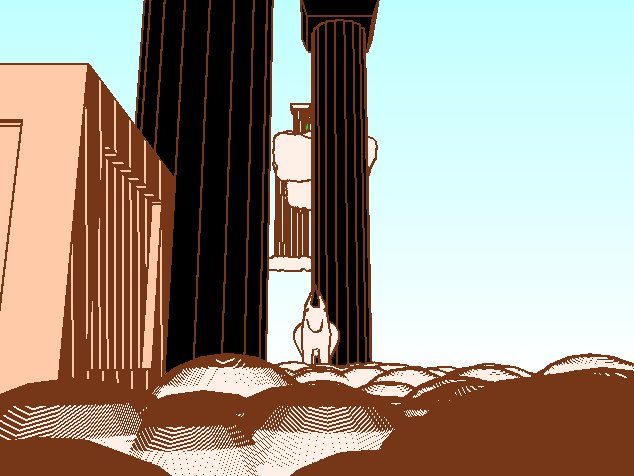
This approach is susceptible to false positives at steep viewing angles and close to the near plane. Usually my preferred solution is to instead compare world-space distance between two planes, inspired by Manifold Garden, but this is far more involved and requires normals. I had an idea to instead solve it by discarding depth edges where both fragments are from the same primitive – this wouldn’t usually work because it would also discard legitimate edges on convex meshes, but for this game I imagine it would work really well. Ultimately I didn’t have time to try this, but I also don’t think this flaw bothers many players other than myself.
Surface index outlines #
The renderer keeps track of an object index that increments for each object drawn. For each primitive that makes up an object I can choose if it should also increment the index, or if it should be considered part of the same object as the previous one. The boxes also have a surface index attribute that is different for each box face (for pills and ribbons the same attribute is reused as a size-independent normalized position along the local x-axis, which is used for the rainbow stripes – so boxes actually can’t be rainbow-colored). This means the surface index can cover similar cases to what you’d typically use normals-based edge detection for (but only for hard edges like on a box), while also drawing outlines between perfectly adjacent objects like between the bricks in walls.
The object shader writes the object and surface index to another render texture that is also attached to the custom framebuffer. WebGL2 supports multiple render targets, so there’s no extra pass for this – a single fragment shader just outputs to the index texture alongside the color texture. Originally I used a regular RGBA texture for this, but once I exceeded 256 objects in the scene I switched to GL_RG16UI format to not have to pack the object index into multiple components. The post-processing simply writes edges whenever neighboring pixels have different object or surface indices – no threshold needed here.
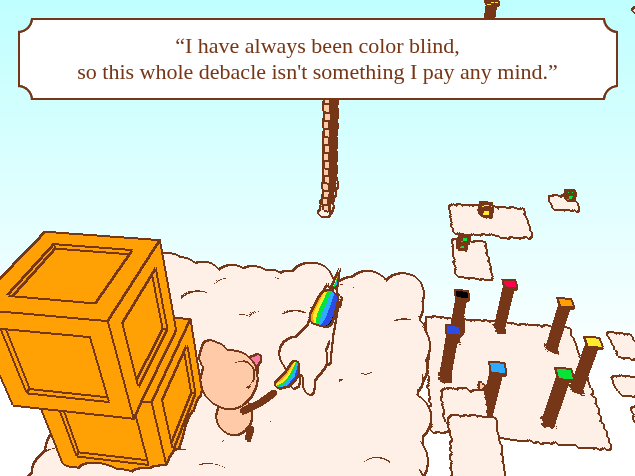
The object outlines get quite cluttered at a distance. The starting area has these seven pillars that progressively regain their color as you collect shards, but when viewed from the further reaches of the map you can barely see their colors because there are outlines everywhere. I wanted to try addressing this by discarding all edges between primitives or surfaces that are part of the same larger object beyond a certain distance, but once again I didn’t have the time.
Modeling #
I know some other participants who made 3D games for the jam had nice setups for modeling in Blender or even picoCAD. Me, however, defined all the models in a big TypeScript object literal. Here’s an excerpt:
{
	name: "pillar16", // ? pillar16
	nodes: [
		{
			translate: [0, 1.25, 0],
			shape: "pill",
			bottomRadius: 1.5,
			height: 16  - 1.125 * 2,
			collision: true,
			visible: false,
		},
		{
			color: COLOR_WHITE,
			translate: [0, -.5, 0],
			shape: "box",
			a1: 3.5,
			height: .75,
			a2: 3,
			collision: true,
		},
		{
			translate: [0, 16, 0],
			shape: "box",
			a1: 3,
			height: .75,
			a2: 3.5,
			collision: true,
		},
		...repeat(16).map((i): ObjectNode => ({
			euler: [0, (360 * i) / 16, 0],
			children: [
				{
					shape: "pill",
					newObjectIndex: true,
					bottomRadius: 0.25,
					height: 16,
					translate: [0, 0, 1],
				},
			],
		})),
	],
},
This honestly isn’t too bad – watch mode and hot reloading means I still get instant feedback just by hitting Ctrl+S. And because it’s TypeScript (not JSON!), it’s easy to insert logic snippets to generate patterns, like you can see with the .repeat(16).map(...) above (this defines the vertical stripes of the pillar in a radius around the center).
Note that this TypeScript code isn’t imported directly into the game. Instead the nested structure (the player has much deeper transform hierarchies than the example above, for e.g. the limbs) is processed into a flat list of draw operations that is then written into a binary data file.
Animation #
All animations are procedural, so they’re defined in the source code, not the data files. They’re pretty much all made up of sine waves and linear rotation, plus a little spring function for the bouncy balloon and the jiggle when lodging into a wall. When drawing, I increment an index for each transform, and accept an object defining overrides for specific transform indices, and this is how animations are applied. There’s obviously no skinning or deformation going on, it’s all rotating chains of rigid primitives.
In the model data I can define a slotName for any node with a transform, and all named slots from all objects are exported into a TypeScript file as numeric constants. So using those constants, I can define animations like this (Terser will inline the constants):
function idleAnimation(): Partial<SlotTransforms> {
	const t = ((currentTime * 10 / Math.PI) % 14) <= 4 ? currentTime * 10 : 0;

	return {
		[obj_unicorn_neckSlot]: {
			euler: [
				Math.sin(t) * 15,
				Math.sin(t * 2) * 20,
				0,
			],
		},
		[obj_unicorn_headSlot]: {
			euler: [Math.sin(t) * 10, 0, 0],
		},
		[obj_unicorn_tailSlot]: {
			euler: [0, 0, Math.sin(currentTime * 8) * 15],
		},
		[obj_unicorn_tail2Slot]: {
			euler: [0, 0, Math.sin(currentTime * 8) * 15],
		},
		[obj_unicorn_tail3Slot]: {
			euler: [0, 0, Math.sin(currentTime * 8) * 15],
		},
	};
}

The most elaborate animation by far is the unicorn’s gallop. I used a reference image to make it, by basically looking at each joint individually to find its minimum and maximum angle throughout the cycle, and its phase offset relative to the other joints, so that I could approximate the whole movement as a bunch of sine waves. I’m no animator, nor do I really know anything about horses, so I imagine the result is probably quite flawed if you know what to look for, but it looks alright to me! I think it took me at least an evening of work to make just the gallop, but every other animation in the game is a lot simpler.
Physics #
Implementing custom collision detection and physics in 3D isn’t something I’ve really done before, so it was a fun challenge. In a way, it was simultaneously both easier and harder than expected. Easier, because I realized how many game-specific assumptions I can make to do the most minimal solution possible. And harder, because this makes it apparent just how much work it would be to write a general-purpose physics engine if I couldn’t make all those assumptions :)
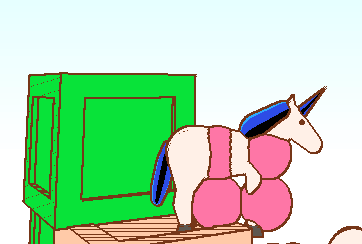
The game only supports two types of collision tests: spheres against axis-aligned boxes, and spheres against capsules. These tests only need a few dozen lines of code in total. The player character is made up of four sphere colliders. Originally I tried to use two stacked capsules, but it turns out collision-checking a capsule against a box is quite a lot harder than with a sphere.
This is all a very asymmetric system; there’s no concept of every physics objects potentially colliding against every other, there’s only the player colliding against the level geometry, and nothing else. This is how I can get away with not even having a broad-phase; the player checks for collisions against every single level collider every frame.
The collision checks also return a depenetration vector – a vector pointing to the closest position that would put the sphere outside the solid collider – so the player is moved freely first and then collisions are resolved after the fact. There’s a lot of limitations to this whole system, which is where even more assumptions come in. Early on, it was possible to stick to walls at the seams between stacked boxes, which I think was because during depenetration the closest point outside a box might be above or below it, if the player is close to its vertical bounds. After some failed attempts, I found the easiest way to solve this was to separate horizontal and vertical player movement. During the horizontal pass, the vertical component of the depentration vector is ignored, and vice versa.
The player could also tunnel through objects if they move from one side to the other in a single frame, and collision checks against boxes don’t work if the sphere center is inside the box (Given a point outside an axis-aligned box, it’s super easy to find the closest point on the box surface by just clamping the point to the box bounds. But if the point is inside, finding the closest point on the outside surface is harder.). Such issues are easily circumvented by subdividing the player’s movement into steps of a fixed size, at the expense of needing to do more collision checks at high speeds. I only ended up needing this for vertical movement (the maximum fall speed is higher than the run speed).
The NPCs that talk when you’re close, and the collectable shards, actually just do distance checks against the player’s center position (so, effectively sphere-sphere collisions). They’re not using the collision system and the four player colliders, because that kind of precision wasn’t needed there.
Authoring levels #
Levels are authored in a similar manner to models, in a big TypeScript object that gets exported into binary data. Here’s a snippet:
// * Shard 3
...repeat(7).flatMap(y => [
	[obj_wall, [16, 40 + y * 4, -50]],
	[obj_wall, [22, 40 + y * 4, -50]],
	[obj_wallEdge, [28, 40 + y * 4, -50],],
	[obj_wallEdge, [10, 40 + y * 4, -50], [0, 180, 0]],
] satisfies LevelDescriptor),
[CLOUD, 40, [10, -51], [28, -49]],

[CLOOD, 60, [60, -45], [10, 10], true],
[NPC, obj_npc1, [63, 60, -49], 135,
  "I was seeking the treasure at the end of the rainbow.\\n" +
  "Now the friends I made along the way are all I have to show."
],

[obj_pillar10, [60, 70, -10], , COLOR_YELLOW],
[CLOOD, 70, [60, -10], [3, 3]],
[BALLOON, [60, 84, -10]],

[obj_pillar16, [60, 80, 30], , COLOR_CYAN],
[CLOOD, 80, [60, 30], [3, 3]],
[BALLOON, [60, 100, 30]],

[BALLOON, [60, 105, 40]],
[BALLOON, [60, 110, 50]],
[CLOOD, 110, [60, 60], [7, 7]],
[CLOOD, 115, [30, 60], [7, 7], true],
[SHARD, COLOR_CYAN, [30, 116, 60]],
The obj_* constants (which are also available in the game code for drawing) reference one of the objects defined in the model data, which the constants are generated from based on each object’s name and index.
Clouds are defined by a height and a horizontal (XZ) span. At load time, spheres are procedurally spawned at even intervals throughout every cloud, using a hash of an incrementing integer to generate “random” offsets and scales to achieve variation that is consistent across runs (JavaScript’s RNG functions don’t support setting a fixed seed). Clouds can optionally be flagged as “safe”, which means they act as checkpoints where the player respawns if they fall. Originally all clouds were checkpoints, but this meant you could get stuck if you landed somewhere unfortunate.
I would say editing levels this way was much more annoying than for the models (though this may simply be because I had much more level design to do). A custom level editor would have been wonderful, but I didn’t much feel like creating one and didn’t really have the time. I had a hard time keeping track of directions, so I ended up putting in an axis gizmo centered on the player in development build. It’s not interactive in any way, it’s just for reference. I also display the player’s position to have some reference when entering coordinates.
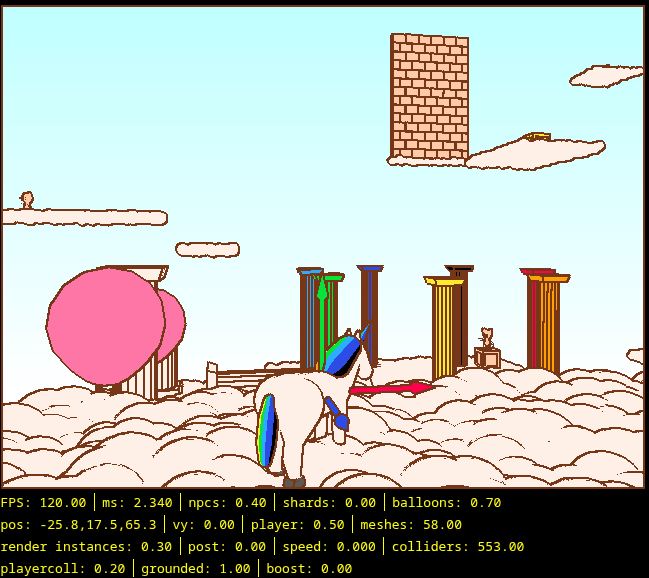
My physics system imposes a major limitation on the level design, because all clouds, walls etc. that use box colliders need to be axis-aligned – in other words, only ever rotated at 90 degree intervals. Capsule colliders can theoretically have any rotation, but I get little use of that because they’re only really used by the pillars, which have box colliders at the ends anyway. It makes the map look a little less organic, but I think it works fine anyway.
Binary data #
I went all-in on binary data for this game. A single binary data file contains all the models, the level data, and even the palette. I personally find constructing my own little binary data formats to be very fun, but it’s not something I often have a reason to do. I think this binary data format was one of the major size savers enabling me to fit Unifrost into 13K, but I can’t say that with real certainty as I never fully compared against any alternative. There’s of course a little bit of overhead from having to load and parse the data, but for the few smaller pieces of data that I originally had in TypeScript and then moved into the binary file (palette, and rainbow shard positions), it saved at least a little bit of space even when factoring in the additional parsing overhead.
The format is quite simple, and in particular makes no real attempt to be clever about optimizing away redundant data like symmetric models, or the procedural repetitions I use in the model and level data. It doesn’t really need to, because in js13kGames it’s the size of the ZIP-archive that matters, and ZIP’s DEFLATE compression already reduces this kind of redundancy very well – that’s what’s it’s made for! The compression rate of my binary file is almost exactly the same as index.html, at around 40% of the original size. The size distribution is around 17% for the binary data and 83% for index.html.
One thing the format does optimize for however, is to quantize data into as small data types as possible. Every number is a fixed-point 8- or 16-bit integer; there are no floats. Positions and sizes of models are single-byte values (Int8 and Uint8 respectively). They’re quantized to a max value of 16, which gives a precision of only 0.00625 or 1/16th of a unit for positions (for reference, the unicorn is 2 units high as horse height is measured). Likewise, angles (all rotations are Euler angles in degrees, because this is what the DOMMatrix APIs accepts natively) are quantized so that 0-255 represents 0-360, giving a precision of about 1.4°. Positions in the the level data are 16-bit fixed point integers, again with a precision of 1/16th units (giving them a range between -4096 and 4096).
One thing that may be tempting to do is to try packing numbers into less than 8 bits, or into something like a stream of, say, 10-bit values. However, this can be counter-productive, because other than making parsing much more complex, if your repeated data patterns aren’t aligned to whole bytes, then DEFLATE compression won’t be nearly as efficient (this is why base64 encoded data compresses relatively poorly, for example). However, there are some sub-byte values in my format. The model data has header values that packs both a 2-bit operation type (“new object”, “draw shape”, “set color”, or “push/pop transform”), and some type-specific data (like the color value, the shape type, or flags indicating what components a transform includes) into a single byte.
Originally, I only had model data in my binary file. So when I needed to add additional data, like the level, I ran into the problem of how to separate sections. The usual go-to would be to have a little header at the beginning of each section indicating its size, but this would waste at least a whole extra byte for each section – often more because sections can be longer than 256 bytes. Another alternative (which I used at one point) is to use a sentinel value to indicate the end of a section (like C’s zero-terminated strings), but this makes parsing more cumbersome and requires picking an unambiguous. sentinel value. None of this was really an issue for separating the palette data. That’s a fixed size, so I just put it at the start, and know that the model data would follow it after reading a fixed number of colors. Then it struck me – it’s not like I need to read arbitrary data from different games, so really all the sections are a fixed size! What I ended up doing then, was that in my binary exporter I output the offset of each section into a file with TypeScript constants that the parser can use to know when to switch to the next section.
For parsing the data, I use a DataView wrapping the ArrayBuffer from a fetch() response. DataView lets you read heterogeneous data types from a buffer. A snippet of the level parsing code looks like this:
// * Read NPCs
let npcIndex = 0;
while (pos < section_npcsEnd) {
	npcs.push({
		obj: dv.getUint8(pos++) as RenderObjectHandle,
		pos: [
			dequantizeBigPosition(dv.getInt16((pos++, pos++ - 1))),
			dequantizeBigPosition(dv.getInt16((pos++, pos++ - 1))),
			dequantizeBigPosition(dv.getInt16((pos++, pos++ - 1))),
		],
		angle: dequantizeAngle(dv.getUint8(pos++)),
		dialogue: dialogue[npcIndex++]!,
		minShards: dv.getInt8(pos++),
	})
}

// * Read shards
while (pos < section_shardsEnd) {
	shards.push([
		dv.getUint8(pos++),
		repeat(dv.getUint8(pos++)).map(() => [
			dequantizeBigPosition(dv.getInt16((pos++, pos++ - 1))),
			dequantizeBigPosition(dv.getInt16((pos++, pos++ - 1))),
			dequantizeBigPosition(dv.getInt16((pos++, pos++ - 1))),
		]),
		0,
	]);
}
Notice the weird little (pos++, pos++ - 1) golfing trick I use to allow incrementing the read offset by two bytes in the same expression that I read the value, without needing to introduce any intermediate variables (it’s not actually very important, but it was fun to figure that one out). Reading strings from a buffer is a bit tricky (you need a separate TextDecoder object, or to do it manually byte-by-byte), so while NPC dialogue is defined alongside the level data for authoring convenience, it’s actually exported into a separate TypeScript array instead.
Game design #
Like I mentioned in the introduction, I already knew before the jam started that I wanted to make something 3D, and I wanted some sort of 3D platformer or adventure game. When the theme was announced, framing the game around collecting the 7 colors of the rainbow and restoring color to the world was an obvious choice. I wanted some unique movement mechanics, and something that enables air control is usually a good bet, so the ability to create rainbows with collected colors and ride them also came quite naturally.
The player character was going to be a unicorn, obviously, but almost everyone was doing that, so I wanted a reason for the player to be a unicorn that wasn’t just set dressing. The distinguishing trait of a unicorn is their horn, so that’s how the wall-flinging mechanic was born (at first I meant for the horn to be used for attacking, but I wanted a mechanic that would also be useful for traversal, and then I soon settled on not even having combat or enemies in the game at all). This mechanic is also a bit similar to the main gimmick of my earlier game Nalleland, so I supposed it was close at hand like that. By tuning the jump height of the horn fling to be really high, it made for a nice vertical movement complement to the rainbow riding’s horizontal movement. I was a bit worried that this mechanic would be troublesome for players to figure out, but it seems like generally players understand it quiet easily (and, importantly, find it very funny!). Even the “fake momentum” needed to do the spin jump that lets you lodge into walls (there’s a hidden “boost charge” that builds up while at max speed, and resets when going slower) seems to have been sufficiently intuitive.
Originally I envisioned the game taking place in a more typical map, think Bob-omb Battlefield or the like, but creating that kind of level geometry with the available primitives, and filling it with enough detail seemed daunting. Once I got the idea of rendering clouds with just spheres, the heavenly setting was an obvious fit that I think worked very well.
The other game mechanics arose quite naturally from the needs I encountered while building the level, and were added pretty late. A lot of design decisions were also driven simply by what seemed easy to implement within my framework, which is the simultaneous creative boon and curse of working with technical constraints. Once you’ve collected a few colors, the rainbow riding grants you a huge amount of horizontal movement which I needed to design around. I wanted some way to make the player move around in more interesting ways than just rainbow-riding in a straight line across a large distance. Putting in a lot of vertical movement that needs the wall-fling was one way of achieving this.
I also wanted a way of forcing the player to jump around to different spots and not just go straight for the shard. I long thought of adding keys that need to be collected to open doors, and then potentially more easily implementable variants like buttons that need pressing (to open doors, or spawn the shard), or little “shard-pieces” that need collecting to get a full rainbow shard. Eventually I realized the easiest variant was making the rainbow shard itself move around between different spots when you approach it. Thus the orange shard, where I know many players got stuck, was born. The same mechanic is reused for the final (violet) shard, that moves around all over the map after you first reach it. This gave me a nice way out of doing more level design for the finale as the deadline loomed over me, while also tying the experience together really neatly by letting the player re-visit previous locations of the map with a nearly fully upgraded moveset.
The bouncy balloons, also added quite late (I redesigned the way to the first shard after adding them) support the level design by providing places you can land on while preventing you from regaining your rainbow uses. This enabled creating jumping puzzles that require you to preserve your rainbow throughout a long series of jumps.
Difficulty #
I think the game ended up quite a bit too difficult, especially for a jam game where people don’t necessarily have the time or patience to try for too long because there are 300 other games to go through. I’m unsure if any voter even finished the game! I didn’t really intend the game to be particularly hard as such. The perceived difficulty is of course going to depend a lot on your prior experience with 3D platformers, but I think there’s a number of different reasons why it ended up more difficult than I would’ve liked:
- The classic problem of me as the developer getting very familiar with the game as I playtest it, ending up with a skewed view of its difficulty.
- I wanted to make the most out of the game’s mechanics, and provide the player with varied and interesting ways to utilize their moveset. When doing this you tend to naturally create relatively difficult challenges, and making the game easier while still being as interesting needs, I believe, much more work and iteration!
- Depth perception is really bad in this game, exacerbated by the total lack of lighting. Precision 3D platformers, going all the way back to Super Mario 64, tend to have a drop shadow to help indicate the player’s horizontal position. I really wanted to add this, but I just didn’t have time to figure out a way of implementing it. The difficulty isn’t just rendering the shadow, but also for example that my physics system doesn’t already have a raycast, so the simplest techniques that boil down to just rendering some geometry at the ground below the player would’ve needed more work to implement than I had time for.
- My beloved girlfriend, and my friends Albin and Dante, are clearly gamers of far too high skill, as they all beat the game during playtesting. I should have tuned the difficulty after Chris instead, since he did not ;)
NPCs #
I added the NPCs with their little snippets of dialogue early on for the vibes, and to an extent for tutorialization. I like to think they add quite a lot of charm, and help give just a little bit more of an adventure feel to an otherwise very abstract and arcade-y game – there’s a bunch of little critters around, and they all need the rainbow back for their own reasons, so now you just have to help them!
The reason they largely speak in rhymes is that I spontaneously rhymed in two of the early lines (“scattered and shattered” and “We used to kiss every day/Now the rainbow is gone, we’re all out of gay”) and thought it would be cute to make that a thing. Some of them don’t rhyme; that’s because I didn’t always come up with a decent one, and you can’t always do things like rhyme “exciting” with “rainbow-riding”.
I wanted to have a few more variants and animations for the NPCs, like a little fellow that sits and fishes at the edge of a cloud (an image that has for some reason persisted deep in my mind ever since I first played classic freeware platformer Knytt many years ago), who would’ve said something about no longer catching any rainbow trout. All characters being essentially genderless (or at least totally androgynous), I also thought of adding some gender expression just for the gay NPCs by giving them both little mustaches. None of this was a priority of course (for that last one, maybe this was for the best).
What’s next #
I’m very happy with how the game turned out, and it seems to have been received pretty well by others too, so I want to publish a “Director’s Cut” version of game to a few more platforms. It’s already on Wavedash because of the sponsored competition category, but I’d also like to put it on itch.io and Newgrounds at the very least. I don’t believe there’s much to add in terms of content; the framing of the seven rainbow shards naturally scopes the game, and it’s a pretty good length for a little web game (the friends who completed it took anywhere from 15-30 minutes). There’s also already a speedrun timer that appears after beating the game once that provides a bit of post-game replayability.
But there are some other improvements I’d like to make – getting that drop shadow in; addressing some of the rough edges of the outline post-processing; improving performance; making the canvas responsive (fullscreen-friendly) or at least larger; gamepad controls; maybe touch/mobile controls; progress saving; and some other minor things. It would be fun if I could make all these improvements while still keeping the game under the 13K limit; I think that should be possible!
As for js13kGames – this was a ton of fun, so I think it’s likely I will participate again, hopefully next year! The jam being a whole month gives a lot of flexibility for participation regardless of how busy I’ll happen to be, so it should be possible to make something small at the very least. I’m not sure if I’ll end up building on top of the Unifrost engine, or do something completely different (maybe a pixelart game?). I suppose I’ll see what I feel like when the time comes around! In any case, it would be fun to work in a custom audio engine, since that’s something I neglected this year and audio programming is an interesting topic that I don’t have much experience with.
P.S #
The markdown source that I wrote this post comes out at around 15.8KiB when compressed with advzip, and that’s of course not including any of image assets, or things like stylesheets. So, this explanation of the game is larger than the game itself!